Add a Referral Button to a Template
The Referral button allows you to access the Referrals dialog in a chart
note where you can add and maintain transition of care and/or referring
out information for a patient, along with the applicable provider and
diagnosis information. When referral information is entered, you have
the ability to display the referral in the Facesheet under the Referrals
section. Likewise, all referral entry and modifications made in a chart
note are tracked in the History tab as well as in the Audit Trail. Use
the following steps to add a Referral button to a template.
Open the Template that you want to add a Referral
button to.
In the Template Editor, click Referral.
Position the cursor where you want the Referral
button to appear in the template.
Click the  button. The Referral
button will then appear in the template.
button. The Referral
button will then appear in the template.
Click the  button to configure the
note heading.
button to configure the
note heading.
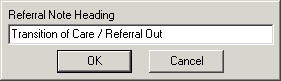
In the Referral Note Heading dialog, enter the
Heading for the Referral button
you are adding, and then click the OK
button. The heading text will then appear to the left of the Referral
button in the chart note.